
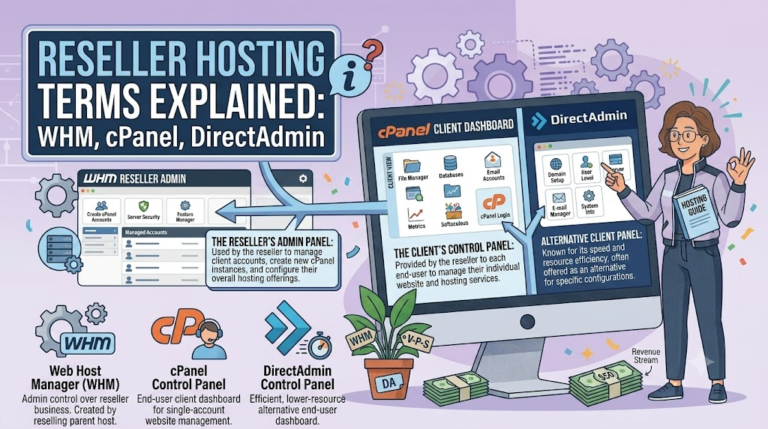
When I first started looking into reseller hosting, I remember sitting there reading through provider websites and just feeling completely lost. Everyone was throwing around terms like WHM, cPanel, and DirectAdmin as if I was supposed to already know what they meant. Nobody stopped to actually explain any of it in plain language, and I did not want to look like I had no idea what I was doing, so I just nodded along and figured it out slowly on my own.
I do not want anyone else going through that same confusion, so I am going to break these terms down the way I wish someone had explained them to me back then. No jargon, no assuming you already know half the vocabulary. Just what these things actually are and why they matter once you are running your own hosting business.
What a control panel actually is in the first place
Before getting into the specific names, it helps to understand what all of these things actually are at a basic level. A control panel is just the dashboard you use to manage hosting accounts without needing to type commands into a server directly. Think of it like the steering wheel and dashboard of a car. You do not need to understand how the engine works to drive it, you just need to know what the pedals and buttons do.
In hosting, this dashboard lets you create email accounts, upload website files, manage databases, install SSL certificates, and a bunch of other tasks, all through clicking buttons instead of typing complicated technical commands. Every reseller hosting business runs on top of one of these panels, which is why understanding the main ones actually matters.
WHM explained, and why it is not the same thing as your regular panel
WHM stands for Web Host Manager. This is the part that confuses people the most because it sounds similar to the other panels, but it plays a completely different role. WHM is not what your individual clients use. It is what you, as the reseller, use to manage the entire hosting environment behind the scenes.
Through WHM, you create new hosting accounts for each client, set their storage and bandwidth limits, manage your own branding so clients see your company name instead of the hosting provider’s name, and control server level settings that affect every account under your reseller plan. Basically, WHM is your control center, and cPanel is what you hand off to each individual client once their account is set up.
If you are running a reseller business built on cPanel, you will be living inside WHM most of the time, not the client facing panel. Understanding this distinction alone saves a lot of confusion when you are first getting your accounts set up, and it is honestly the single thing that confused me the most when I was reading through provider documentation for the first time. I kept assuming WHM and cPanel were just two names for the same thing, until I actually logged in and realized they looked completely different and served completely different purposes.
cPanel reseller hosting: the part most people actually recognize
cPanel is probably the most well known hosting panel out there, mostly because so many hosting companies use it and so many tutorials online are built around it. This is the panel your individual clients will log into to manage their own website. It has a clean, icon based layout where they can upload files, create email addresses tied to their domain, install WordPress, check their storage usage, and handle basic website management tasks without needing to know anything technical.
From a business standpoint, cPanel being so widely recognized is actually a selling point. A lot of your clients, especially ones who have had hosting before somewhere else, will already be somewhat familiar with how it looks and works, which means less time spent explaining the basics and more time actually helping them with real questions.
DirectAdmin reseller hosting: the other major option
DirectAdmin does basically the same job as cPanel and WHM combined, but with a different design and a different pricing structure behind it. Instead of having a separate admin panel and client panel like cPanel and WHM, DirectAdmin uses one panel with different permission levels depending on whether you are logging in as the reseller, an individual client, or a full administrator.
I ended up going with a DirectAdmin based reseller plan through Bisup for an affordable reseller hosting when I set my own hosting business up, and honestly the simplicity of having everything in one interface made a real difference for me early on. There was less jumping back and forth between two separate systems, which mattered a lot when I was still learning how everything fit together.
DirectAdmin also tends to be lighter on server resources compared to cPanel, which is part of why some reseller plans built on it come in at a lower price point. That was actually a big factor for me when I was starting out on a tight budget and did not want to overspend before I even had my first client signed up.
Why understanding these terms actually matters for your business
You might be wondering why any of this matters if you are just going to click around and figure it out anyway. Here is the thing though, understanding these terms properly changes how you talk to your clients and how confident you sound when something goes wrong.
If a client emails you asking why they cannot access their email settings, and you understand the difference between what they see in their panel versus what you control in yours, you can actually diagnose the problem instead of guessing. If a client asks why their hosting looks different from a friend’s hosting with a different company, you can explain that it is because you are using DirectAdmin instead of cPanel, and actually sound like you know what you are talking about instead of stumbling through an explanation.
This stuff also matters when you are choosing a reseller plan in the first place. Some providers only offer cPanel, some only offer DirectAdmin, and some offer both. Knowing the actual differences means you can pick the option that fits your budget and your comfort level, instead of just picking whatever the first provider you found happens to offer.
Other terms you will run into along the way
Beyond the big three, there are a few smaller terms that come up a lot once you start actually running things day to day. SSL certificates are the little padlock icon browsers show for secure websites, and most panels now let you install these for free with just a couple of clicks. DNS records are basically the address book that tells the internet where to find a particular website or email server, and you will end up touching these more than you expect, especially when clients are moving their domain over to you for the first time.
Bandwidth and storage limits are exactly what they sound like, how much data a client’s site can use up and how much space their files and emails can take. These get set at the account level through your WHM or DirectAdmin panel, and understanding how to adjust them properly avoids a lot of confused messages from clients wondering why their site suddenly stopped working.
One more term worth knowing is nameservers, which are basically the addresses that tell the rest of the internet which company is actually hosting a particular domain. When you set up your own reseller business, you usually get to set custom nameservers with your own branded name instead of pointing clients toward the parent hosting company’s default ones. This is a small detail, but it matters a lot for how professional your business looks. A client seeing their domain pointed at nameservers with your company name feels a lot more confident than seeing some unfamiliar name they do not recognize.
Managing all of this without losing your mind
Here is something I did not expect when I started. Learning these panels is actually the easier part. The harder part is managing everything else that comes with running a business alongside the technical side, things that have nothing to do with hosting at all but still eat up your time and attention every single day.
For me, one of those things ended up being keeping track of my own finances properly, especially once I started accepting a mix of regular payments and a bit of crypto from a few clients who preferred paying that way. I started using a tool called Thupro to keep an eye on crypto news and manage that side of things properly, since trying to juggle hosting support tickets and keep track of market movements manually in a spreadsheet was just not sustainable for me. Having something dedicated to that part meant I could actually focus on my clients and my panel work instead of splitting my attention constantly.
Little things like that add up more than people expect when you are running a small hosting business mostly on your own.
Putting it all together
At the end of the day, none of these terms are as complicated as they sound when you first come across them. WHM is your backstage control room. cPanel or DirectAdmin is what your clients actually use day to day. SSL, DNS, bandwidth, and storage are just the smaller pieces that make everything actually work once the basic setup is done.
I know it feels like a lot when you are just starting out and reading through provider websites full of terms nobody bothers to explain properly. But once you actually spend a bit of time in a panel, clicking around and seeing what each section does, it clicks a lot faster than you would expect. Give yourself a weekend to just explore without worrying about breaking anything, and you will walk away understanding this stuff better than most guides could ever explain it to you.
Reseller hosting is one of those businesses where the technical side looks intimidating from the outside but turns out to be pretty manageable once you actually get your hands on it. The vocabulary is really the biggest hurdle, and now that you know what these terms actually mean, that hurdle is basically gone.
