
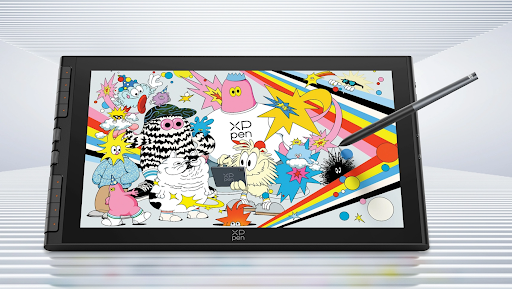
Finding the perfect balance between a spacious canvas and a portable device is a challenge for many digital artists. The XPPen Artist 16 3rd aims to solve this dilemma with its 15.4-inch display and a host of new features.
Packed with the next-generation X4 Smart Chip Stylus and innovative dual X-Dial shortcuts, the XPPen Artist 16 3rd promises a professional-grade experience at an accessible price point. But does it? This review will explore its features, real-world performance, and value to help you decide if it’s the right tool to empower your creative journey.
Overview of the XPPen Artist 16 3rd
The Artist 16 3rd is XPPen’s latest 15.4-inch portable drawing display designed for entry-level creators, students, and hobbyists. Its core proposition is delivering a large, color-accurate workspace in a slim and lightweight package. It marks a significant upgrade with the introduction of the X4 Smart Chip Stylus, offering 16,384 levels of pressure sensitivity and a 2g initial activation force, putting its pen performance on par with higher-tier models. This device is built to be a complete, grab-and-go solution for creative work anywhere.
Key Features of the XPPen Artist 16 3rd
Design & Build Quality
The Artist 16 3rd adopts a sleek and modern design, measuring just 12.8mm thick and weighing 1355g, making it highly portable for a 15.4-inch display. While the build is primarily constructed from durable plastic, it feels solid enough for daily use and transport. The back features rubber feet for a stable grip on a desk, and a foldable stand is included in the box to provide a comfortable drawing angle, a thoughtful addition that enhances ergonomics right out of the gate. The highlight of the design is the magnetic attachment on the top, which securely snaps the stylus in place for safe storage and prevents it from getting lost.
Performance: The X4 Smart Chip Stylus
The star of the show is undoubtedly the new X4 Smart Chip Stylus. Its performance is a major leap forward, directly competing with more expensive drawing tablets. The key improvements are:
- 16,384 Pressure Levels: The X4 chip enables 16K pressure levels, allowing for incredibly nuanced and precise strokes, from the lightest sketch lines to the boldest sweeps.
- 50% Shorter Response Time (30ms): This results in virtually lag-free drawing, providing a fluid and natural experience that closely mimics the feel of traditional media.
- 2g Initial Activation Force: The pen responds to the slightest touch, making it ideal for delicate linework and creating fine details with minimal effort.
- Enhanced Stability: The bullet-shaped pen tip and reduced tip travel distance (to just 0.3mm) significantly minimize nib wobble, ensuring your lines are steady and accurate.
Core Features and Interface
The Artist 16 3rd is equipped with a comprehensive shortcut system on its left side, designed to streamline your workflow and reduce reliance on your keyboard. It includes:
- Dual X-Dial: Two customizable dials allow you to effortlessly zoom in and out of the canvas, adjust brush sizes, or control other functions on the fly. This intuitive control is a massive time-saver.
- 8 Customizable Shortcut Keys: These buttons can be programmed for frequently used commands like undo, delete, copy, and more, placing essential actions at your fingertips.
Real-world Experience
The combination of the X4 stylus and the X-Dial system makes for a highly efficient and enjoyable drawing experience. The initial setup is straightforward; you simply connect the tablet to your PC or Mac with the included full-featured USB-C cable and install the driver. The 15.4-inch screen feels like a “Goldilocks” size—large enough to have a spacious canvas for detailed work, but compact enough to not overwhelm a desk or a laptop bag. The matte surface reduces glare and provides a pleasant, paper-like texture that offers just the right amount of resistance while drawing.
Software / Compatibility
XPPen ensures broad compatibility with this device, supporting Windows 7 or later, macOS 10.13 or later, Android 10.0 or later (USB 3.1 DP1.2 required), ChromeOS 88 or later, and Linux. It works seamlessly with popular creative software like Adobe Photoshop, Illustrator, Clip Studio Paint, Krita, and Blender.
Battery / Connectivity
The Artist 16 3rd does not have a built-in battery and is powered directly via a USB-C connection. This keeps the device lightweight. The connectivity options are versatile: it features a Full-featured USB-C port for a single-cable connection to modern devices (providing both power and video) and a 3-in-1 USB-C port for use with an HDMI cable (included), ensuring compatibility with older computers that lack USB-C video output.
What Can You Use XPPen Artist 16 3rd For?
- Digital Illustration and Drawing: The 16K pressure levels and paper-like feel make it perfect for bringing illustrations to life. As one user noted, drawing on this screen is a “dream” with “vivid and satisfying to look at” colors.
- Graphic Design: With its impressive 99% sRGB color accuracy (ΔE < 1.5), it’s a reliable tool for projects requiring precise color fidelity.
- Animation: The low latency and stable pen tip are beneficial for frame-by-frame animation, providing the control needed for precise line art.
- Photo Editing and Retouching: The matte, anti-glare screen and accurate stylus allow for detailed, precise edits in Adobe Photoshop and other editing software.
- On-the-go Sketching & Note-taking: The lightweight design and magnetic stylus make it an ideal companion for students or creators who need a digital sketchbook.
Who should buy it?
The XPPen Artist 16 3rd is a phenomenal option for a specific audience. It is an excellent choice for:
- Students and Hobbyists: It offers an incredible price-to-performance ratio, providing pro-level features like the X4 pen and excellent color accuracy without breaking the bank.
- Beginners transitioning from pen tablets: If you’re looking to upgrade to a drawing display for the first time, this is a fantastic entry point that you won’t quickly outgrow.
- Digital artists who need a portable setup: Its thin profile and light weight make it ideal for creators who are constantly on the move.
- Budget-conscious illustrators and designers: The feature set rivals that of more expensive competitors, making it an outstanding value proposition.
However, it may not be the best fit for everyone. Some users have noted that the 1920×1080 (Full HD) resolution, while sharp, might not be sufficient for those used to 4K displays. The 15.4-inch screen size, while a great balance for many, might feel cramped for professional artists who work on highly complex and large-scale projects. Professionals who require absolute top-tier color accuracy or higher resolution should consider XPPen’s higher-end models, such as the Artist Pro series.
FAQs
1. Is the XPPen Artist 16 3rd worth it?
Yes, absolutely. For its price point, the XPPen Artist 16 3rd offers exceptional value. It combines a large 15.4-inch color-accurate display, the advanced X4 Smart Chip Stylus, and a handy shortcut system, making it a worthy investment for beginners and students looking for a professional-grade tool.
2. Does the Artist 16 3rd work with Android phones?
Yes, it supports Android 10.0 or later (USB 3.1 DP1.2 required) with a direct USB-C connection. However, the actual performance depends on the phone’s battery level and USB port power output. Some phones may require an external power source for a stable connection.
3. What is the difference between the X3 and X4 Smart Chip Stylus?
The X4 chip offers double the pressure sensitivity (16,384 levels vs. 8,192) and is 50% faster (30ms response time vs. 70ms) than the X3 chip. This results in smoother, more precise, and more responsive strokes.
4. Does the screen have a paper-like feel?
Yes. The screen is covered with AG+AF nano-etched glass, which effectively reduces glare, resists fingerprints, and provides a satisfying, paper-like drawing experience that gives just enough tooth to feel like you’re drawing on actual paper.
Conclusion
The XPPen Artist 16 3rd delivers exceptional value for its price, successfully combining a spacious 15.4-inch display, the advanced X4 Smart Chip Stylus with 16K pressure levels, and an intuitive X-Dial shortcut system into a highly portable package. While the Full HD resolution and screen size may not satisfy professionals working on 4K projects, this display is an outstanding choice for students, hobbyists, and aspiring artists seeking a future-proof tool that punches well above its weight class.
If you’re looking for a feature-rich, portable drawing display that prioritizes pen performance and workflow efficiency without breaking the bank, the Artist 16 3rd is a compelling investment that will serve your creative journey for years to come.
