
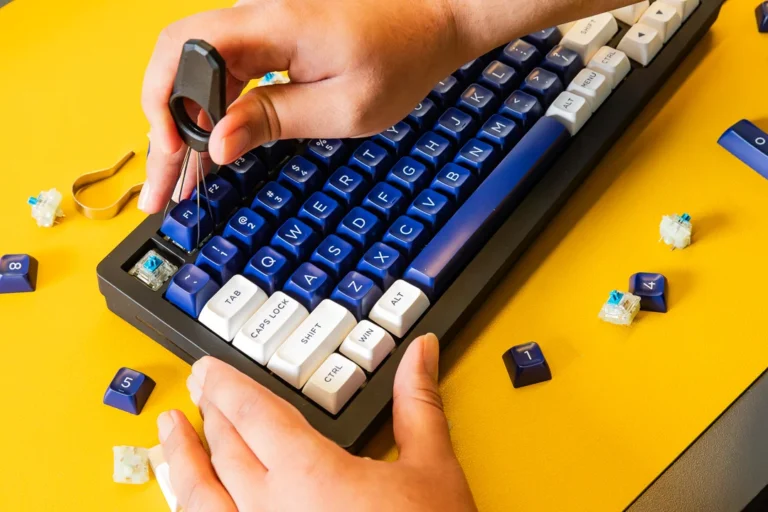
Mechanical keyboard kits have become increasingly popular among gamers, programmers, remote workers, and keyboard enthusiasts. Instead of buying a fully assembled keyboard, more users now prefer building their own setup to achieve better typing feel, acoustics, and personalization.
Discussions across communities like r/MechanicalKeyboards and product insights from brands such as Keychron show that DIY keyboard building has evolved from a niche hobby into a mainstream customization trend driven by comfort, ergonomics, and performance needs.
This guide will help you understand what a mechanical keyboard kit is, how to choose the right one, and how to build and customize it step by step.
What Is a Mechanical Keyboard Kit?
A mechanical keyboard kit is a collection of core components used to assemble a fully functional keyboard. Unlike prebuilt keyboards, kits give users control over nearly every part of the build.
Most kits typically include:
Keyboard case
PCB (printed circuit board)
Plate
Stabilizers
Depending on the package, switches and keycaps may or may not be included.
The PCB is the most important component, as it registers each keypress through individual mechanical switches. Many modern kits also support hot-swappable PCBs, allowing users to change switches without soldering.
Each component plays a role in performance and feel:
| Component | Function |
| PCB | Detects key inputs |
| Plate | Stabilizes switches |
| Case | Holds structure and affects acoustics |
| Stabilizers | Improve stability of larger keys |
Why Build a Mechanical Keyboard Kit?
Building a keyboard kit allows users to fully customize their typing experience. Unlike prebuilt keyboards, DIY builds offer control over nearly every aspect of performance and design.
Key benefits include:
Full customization of switches and keycaps
Adjustable typing sound and feel
Improved ergonomic setup
Better long-term comfort for extended use
Many users in programming and gaming communities report reduced fatigue and improved typing satisfaction after switching to custom-built keyboards.
Is a DIY Keyboard Kit Better Than a Prebuilt Keyboard?
A mechanical keyboard kit is not automatically superior to a prebuilt keyboard—it depends on user needs.
Prebuilt keyboards offer convenience and immediate usability, while DIY kits provide flexibility and personalization.
For example:
Gamers may prefer fast linear switches in a custom build
Office users may choose quieter tactile setups
Beginners may find prebuilt keyboards easier to start with
DIY kits require more time and learning, but they offer significantly more control over the final experience.
How to Choose the Right Mechanical Keyboard Kit
Selecting the right kit depends on layout, build quality, and feature support.
Keyboard Layout Options
Different layouts affect size, usability, and desk space efficiency.
| Layout | Best For |
| 60% | Minimal setups and portability |
| 65% | Compact use with arrow keys |
| 75% | Balanced productivity and space |
| TKL | Gaming and office use |
| Full Size | Data entry and number-heavy work |
Build Quality and Material Choices
Material selection significantly affects typing feel and sound.
Aluminum cases: solid, premium feel, better acoustics
Polycarbonate cases: softer sound profile, flexible design
Hot-swap PCBs are especially popular because they allow switch replacement without soldering.
Many enthusiast-grade kits also feature gasket-mounted designs, which help reduce vibration and create a softer typing experience.
How to Assemble a Mechanical Keyboard Kit
Building a keyboard kit follows a structured process that beginners can also complete with patience.
Basic Assembly Steps:
Install stabilizers on the PCB
Mount switches into the plate
Combine PCB and plate assembly
Place the assembly into the case
Test all keys before final tightening
Stabilizer tuning is often the most time-consuming step, especially for larger keys like spacebar and shift.
Tools You Need for Keyboard Building
To build a keyboard kit, a few basic tools are recommended:
Keycap puller
Switch puller
Screwdriver set
Tweezers
Lubricant for stabilizers
Advanced users may also use foam mods, tape mods, or sound-dampening materials to fine-tune acoustics.
Beginners are usually advised to start with a hot-swap kit to avoid soldering.
Customization Options for Mechanical Keyboard Kits
One of the biggest advantages of DIY keyboard kits is customization.
Common customization options include:
Custom keycaps and themed sets
Artisan keycaps for decorative accents
Switch swapping and lubrication
RGB lighting customization
Case foam and tape modifications
Sound tuning is especially popular, where users adjust internal foam or stabilizers to achieve deeper or quieter acoustics.
Conclusion
A mechanical keyboard kit offers one of the most flexible ways to build a personalized typing experience. While it requires more effort than purchasing a prebuilt keyboard, it allows complete control over performance, sound, and aesthetics.
From layout selection to switch choice and acoustic tuning, every detail can be customized to match individual preferences. For users seeking better comfort, improved typing feel, or a unique desk setup, building a keyboard kit is a highly rewarding option.
FAQs
What does a mechanical keyboard kit usually include?
Most kits come with a case, PCB, plate, and stabilizers. Some premium kits may also include foam layers or cables.
Is building a keyboard kit hard for beginners?
Not necessarily. Hot-swappable kits make the process much easier since no soldering is required.
How much does a mechanical keyboard kit cost?
Entry-level kits typically start around $50, while premium aluminum or gasket-mounted kits can exceed $300 depending on materials and features.
